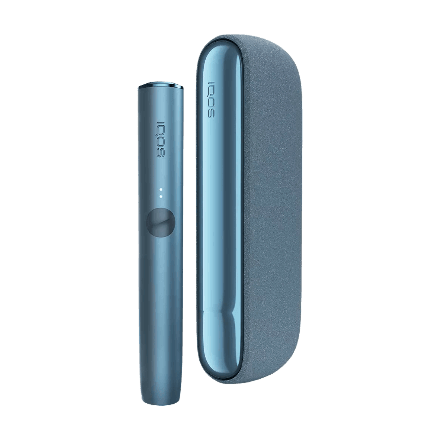
IQOS has recently been quite hyped as an alternative to conventional cigarettes. If you've just bought this device but are still figuring out how to use it, don't worry.
Operating IQOS is actually very easy, as long as you know how. To maximize your first Terea experience, just follow the instructions on how to use IQOS for beginners in this article.
Types of IQOS
Before we get into how to use it, you should also know which IQOS series are currently popular. Since Terea is the popular stick right now, we'll focus on the IQOS Iluma series. Here are the variants:
1. IQOS Iluma Prime
This is the highest caste of IQOS. Its design is very premium because the pocket charger uses a fabric or leather cover. It's perfect for those who want to look elegant and subtly flex when hanging out.
2. IQOS Iluma (Regular)
It carries the iconic classic IQOS design in general, complete with a separate pocket charger and holder. The most suitable choice for daily use with a modern look.
3. IQOS Iluma One
Well, if you're the type who likes practicality, this variant is the most suitable. It's an all-in-one form (no separate pocket charger), making it more compact to slip into your pocket. The battery also lasts for multiple uses.
How to Use IQOS
Let's get straight to the how-to part of using IQOS that beginners must know:
1. Check Battery Capacity
Before you start, make sure your IQOS device has enough battery. Just press the button on the pocket charger. If the indicator light is on, it means the device is ready to accompany your daily activities.
2. Insert the Terea Stick
Take your favorite tobacco stick (Terea), then gently insert it into the hole on the top of the device. Remember, insert it straight until it reaches the line on the stick, and do not twist it to prevent damage to the inside.
3. Turn On the Device
Press and hold the button on the device's body until you feel the first vibration and the indicator light flashes. This means IQOS is heating up the tobacco stick. Wait calmly for about 20 seconds until the device vibrates again and the light stays on (stops flashing).
4. Time to Enjoy!
When the light is fully on, IQOS is ready for you to puff. Take slow puffs like you would with a regular cigarette. Generally, one stick can last for about 14 puffs or approximately 6 minutes, depending on your puffing style.
5. Pay Attention to the End Signal
If the device suddenly vibrates again and the light starts flashing, it means your session is almost over (approximately 2 puffs or 30 seconds left). Finish it slowly until the light automatically turns off.
6. Remove the Terea Stick Correctly
Now, this is an important part to keep your device durable and clean. Gently remove the used tobacco stick. Dispose of the used stick, and your device is ready to be stored or recharged for the next session.
Conclusion
It's really easy, isn't it? Once you get used to it, using IQOS feels much more practical and certainly doesn't leave a smoke smell on your clothes.
For those of you who want to restock your favorite Terea flavors or even just want to buy an IQOS Iluma device, just head straight to the nearest Vapeboss branch. Happy trying!
Read Other Articles
18 Vapeboss Branches That Sell Terea IQOS!
5 Recommendations for the Best Terea IQOS Flavors!